
Procedure for Setting Up a 2 Horn Interferometer
Set up and run a two-horn interferometer with a Lime SDR and GNU Radio. The GNU Radio spectrometer programs write time-stamped data files once every integration time. The adding spectrometer is Adding interferometer (download GRC). Its data includes spectra for horns A and B, plus power spectra from their summed signals. The multiplying spectrometer is Multiplying interferometer (download GRC). Its data includes spectra for horns A and B, plus interference magnitude and phase.
-
List of Equipment
-
2 Horn telescopes, each consisting of:
- horn and can antennae
- cradle
- stand
- bolts for cradle axle
- clamps - recommended to secure the cradle position after the horn is aligned
-
Electronics
- computer with the GNU Radio spectrometer program on it:
- adding spectrometer program: Adding interferometer (download GRC)
- multiplying spectrometer program: Multiplying interferometer (download GRC)
- Lime SDR with USB cable to connect to a computer – This SDR can digitize 2 channels.
- 2 bias T’s for powering the LNA’s; the Lime does not provide power to the LNA’s.
- 5 V transformer to power the bias T’s
- 2 SMA cables to connect the Lime Rx outputs to the “RF” inputs of the bias T’s
- 2 long SMA cables to connect the “RF+dc” outputs of the bias T’s to the LNA’s
- 2 LNA’s
- computer with the GNU Radio spectrometer program on it:
-
Accessories for setting up
- duct tape - recommended for taping the devices and cables in place
- inclinometer - recommended for setting the telescope angle
- E-W (N-S) line - critical!
- best method: determined, prior to a run, from the shadow of a vertical pole or string at sun’s transit
- or determine using an accurate compass
- Large protractor to help orient the telescopes
- pliers for tightening the horn rotation axis
- string - can be useful for aiding the alignment of the horns relative to each other
- tape measure
- tent in case of rain
-
-
Schematic Diagram and photo of the electrical connections
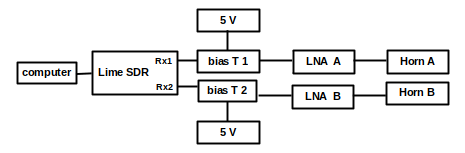
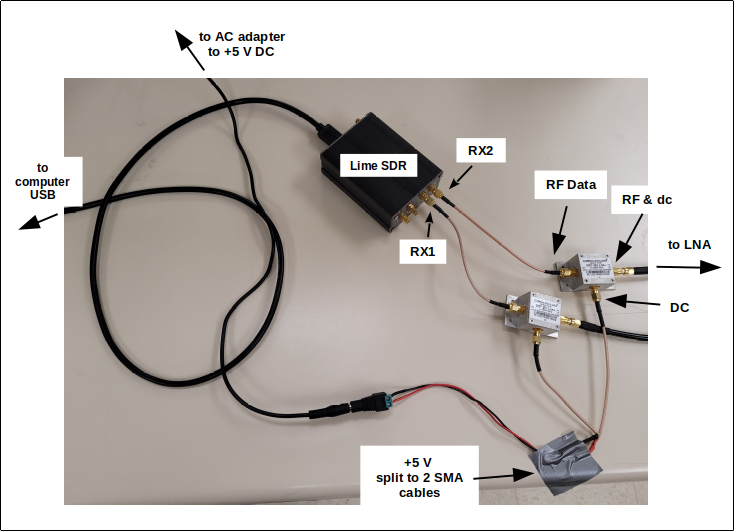
-
Setting up the horns
- Assemble 2 horns as would be done for a single horn observation.
- For an east-west baseline, align the horns in parallel toward the same sky position (e.g. the transiting Sun).
- Here are some tips:
- Sometime before doing interferometry, establish the N-S direction marking the shadow of a vertical pole when the sun transits.
- For an east-west baseline, use a large compass or square. Mark the east-west direction perpendicular to north-south. A tape measure or string can be useful for doing this.
-
Setting up the electrical connections - REFER TO THE PHOTO ABOVE
- The cable connected to RX1 on the Lime SDR collects “Horn A” data. RX2 collects Horn B data.
- Plug in the 5 V dc transformer that powers the bias-T’s. Check that the power strip is on.
- The “RF” terminal of each bias-T is connected to the respective RX1 and RX2 on the Lime.
- The “RF + dc” terminal of each bias-T is connected to the respective LNA.
-
NOTE ABOUT COMPUTER POWER: Be sure the computer power settings are such that it does not go to sleep. Also, for longer runs it is recommended to have the computer plugged in during the run.
-
For Adding Interferometry:
-
Run the spectrometer program limesdr-adding.grc
-
Plug the Lime SDR into a USB port.
-
On the computer set up the file directories for data collection:
-
Create a folder appropriately titled for the data collection, e.g. “Sun_scan_July21”. Be sure any folders and filenames have no spaces in them.
-
Run GNU Radio: $ gnuradio-companion
-
Open the Variable boxes described below in limesdr-adding.grc. They are at the upper left of the GNU Radio canvas:
-
Open the “prefix_hornA” Variable block (double-click it). For “Value”, enter the quoted path to the folder for Horn A spectra. In this example, it is “hornA_july21”. That folder is inside “sun_july21”, which is inside “interferometer_data”. This will be written in the prefix-hornA Variable box as: “/home/john/dspira_2021/interferometer_data/sun_july21/hornA_july21/”
-
Set up similar file pathnames in the Variable blocks “prefix_hornB” and “prefix_adding”.
-
Be sure these sub-folders on the computer have been created.
-
-
-
If all is good, you are ready to go. Delete the test files in each folder (not required but recommended).
-
Start the program. Select “Long Integration” and “Writing to File”. If all is good, the graphs should show signals being collected.
-
-
For Multiplying Interferometry:
-
Run the spectrometer program limesdr-multiplying.grc
-
Plug the Lime SDR into a USB port.
-
On the computer set up the file directories for data collection:
-
Create a folder appropriately titled for the data collection, e.g. “Sun_scan_July21”. Be sure any folders and filenames have no spaces in them.
-
Run GNU Radio: $ gnuradio-companion
-
Open the Variable boxes described below in limesdr-multiplying.grc. They are at the upper left of the GNU Radio canvas:
-
Open the “prefix_mag” Variable block (double-click it). For “Value”, enter the quoted path to the folder for interference magnitude. In this example, the data goes into “magnitude_july21”. That folder is inside “sun_july21”, which is inside “interferometer_data”. This will be written in the prefix-mag Variable box as: “/home/john/dspira_2021/interferometer_data/sun_july21/magnitude_july21/”
-
Set up similar file pathnames in the Variable blocks “prefix_phase”, “prefix_hornA”, and “prefix_hornB”.
-
Be sure these sub-folders on the computer have been created.
-
-
-
If all is good, you are ready to go. Delete the test files in each folder (not required but recommended).
-
Start the program. Select “Long Integration” and “Writing to File”. If all is good, the graphs should show signals being collected.
-
Check recording before a long run
Briefly select Writing to File, then stop the program and inspect each output folder.
Confirm that new, time-stamped files contain data for the selected spectrometer.
Keep test observations separate from the science run.
Use your browser’s Print command if you need a field copy of these instructions.